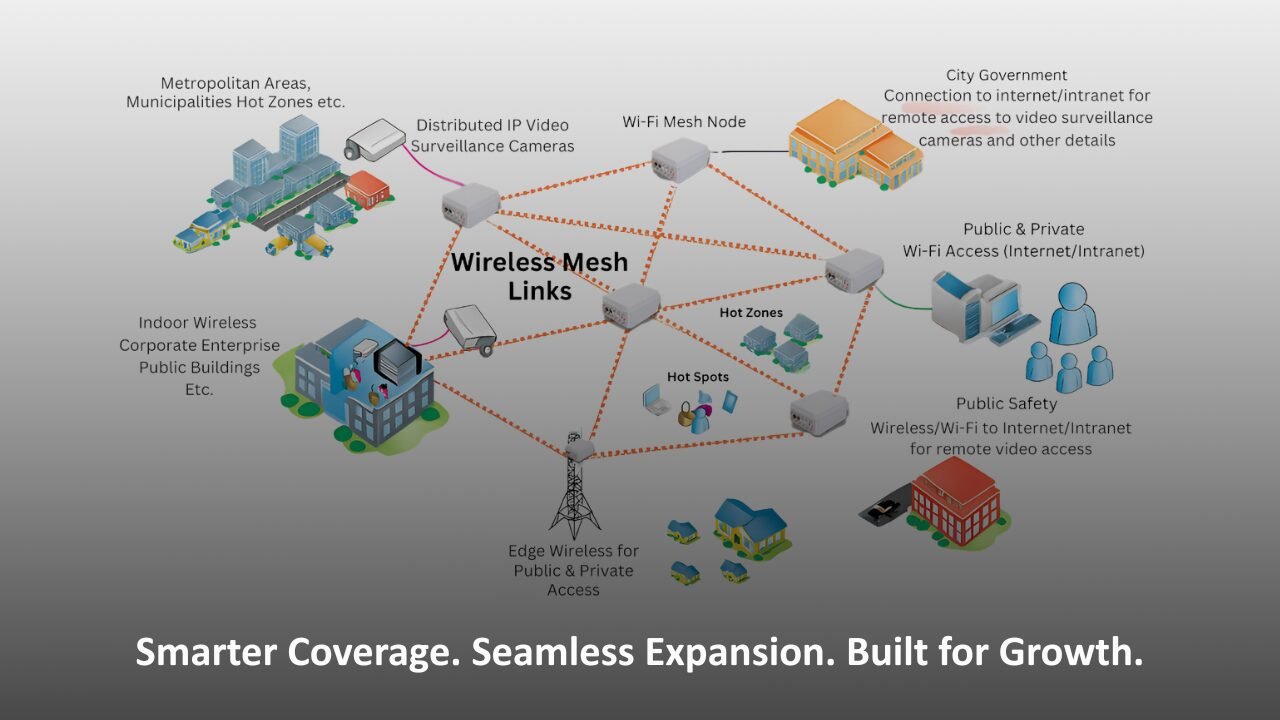
In today’s digital-intensive world, enterprises are under constant pressure to deliver seamless connectivity – not just in headquarters but across sprawling campuses, remote branch offices, and hybrid work environments. Traditional Wi-Fi approaches often struggle under this demand, exhibiting coverage gaps, inconsistent performance, and complex infrastructure costs. Mesh Wi-Fi has emerged as a powerful solution capable of scaling wireless networks in a way that is resilient, adaptable, and easier to manage.
But theory alone won’t help a network engineer or IT leader make informed decisions. This guide moves past abstract promises. It offers concrete deployment steps, real-world use cases, statistics where relevant, and expert insights you can apply immediately.
Whether you’re preparing for a phased rollout or evaluating alternatives like traditional access point (AP) architectures, by the end of this article you’ll have a clear roadmap for scaling enterprise networks with mesh Wi-Fi.
Why Mesh Wi-Fi Matters for Enterprise Scaling
Traditional enterprise Wi-Fi typically relies on a controller-based architecture with a central controller managing distributed access points. While this works well in stable, predictable environments, it reveals limitations as scale and complexity grow.
Mesh Wi-Fi offers a different paradigm: every node can serve clients and relay traffic dynamically. This creates a self-healing network that adapts to changes in traffic patterns and physical disruptions. For enterprises with large buildings, multi-floor campuses, or outdoor spaces, mesh Wi-Fi isn’t just a convenience – it’s a strategic foundation.
Before we dig into deployment, let’s look at some compelling reasons enterprises are adopting mesh:
- Improved coverage without trenching cables: In environments where Ethernet runs are expensive or impractical, mesh nodes extend wireless reach through wireless backhaul.
- Simplified expansion: New nodes can be added with minimal configuration, automatically integrating into the mesh.
- Resilience and redundancy: If a node or wired link fails, mesh routing dynamically redirects traffic through alternate paths.
- Centralized management: Modern mesh solutions include cloud-based dashboards, analytics, and AI-driven optimization.
Planning Your Enterprise Mesh Deployment
Deploying mesh Wi-Fi isn’t plug-and-play. Proper planning ensures you avoid common pitfalls like over-saturation, interference, or poor client experience.
Assess Coverage Requirements
Begin with a detailed site survey. This can be physical or using predictive design tools. Key steps include:
- Mapping high-density zones (e.g., conference rooms, lobbies, manufacturing floors)
- Identifying potential interference sources (e.g., microwave ovens, heavy machinery)
- Understanding building materials – concrete, metal, and glass often attenuate signals
Aim to identify coverage and capacity goals before choosing hardware.
Select the Right Mesh Hardware
Not all mesh systems are equal. In an enterprise context, focus on:
- Tri-band radios: These improve backhaul performance by dedicating one band to node-to-node communication.
- PoE support: Power over Ethernet simplifies deployment and ensures reliable power delivery.
- Enterprise-grade chipsets: Higher throughput and better client handling improve long-term performance.
Practical example: A university campus might choose tri-band mesh nodes with dedicated 5 GHz backhaul to support high student density, while a warehouse might prioritize ruggedized outdoor mesh units.
Plan Backhaul Strategies
Backhaul – the link between mesh nodes – can be wired, wireless, or a mix of both.
- Wired backhaul is ideal where Ethernet is available; it offloads mesh traffic and preserves wireless spectrum.
- Wireless backhaul is necessary in locations without cable access but requires careful channel planning to avoid interference.
A common hybrid strategy is to wire key nodes and allow wireless backhaul for peripheral or hard-to-reach locations. This balances performance and deployment cost.
Step-by-Step Deployment Process
Below is a practical deployment flow you can adapt to your enterprise environment.
1. Define Zones and Priorities
Segment your network into logical zones. For example:
- High-priority zones where performance must be optimized (e.g., boardrooms).
- General coverage zones for standard use (e.g., hallways).
- Temporary or flexible spaces (e.g., events or pop-ups).
This helps guide where to place high-density nodes versus standard ones.
2. Physical Installation and Node Placement
Follow these best practices:
- Mount nodes at ceiling height for optimal coverage.
- Avoid placing nodes near heavy machinery, thick walls, or large metal objects.
- Ensure a clear line of sight between nodes where possible.
You want mesh nodes to “see” each other without significant blockage.
3. Configure Mesh Parameters
Within your management dashboard:
- Assign SSIDs and security policies.
- Enable mesh features like automatic routing and self-healing.
- Configure QoS for VoIP or critical applications.
- Set up VLANs and segmentation for security.
Remember: consistency matters. Utilize templates or profiles to standardize settings across nodes.
4. Validate and Optimize
After installation:
- Perform walk-tests with tools like Ekahau or AirMagnet.
- Check throughput and latency in key zones.
- Adjust node placement or power levels based on results.
This phase often reveals small tweaks that significantly improve performance.
Real-World Use Cases
Campus and Large Facilities
Universities, hospitals, and corporate campuses benefit from mesh Wi-Fi’s scalability. Instead of running Ethernet everywhere, institutions can deploy nodes in outdoor quads, multi-story buildings, and annexes with minimal infrastructure changes.
Example: A university with 30 buildings rolled out a tri-band mesh network that reduced dead spots by 92% and cut annual support tickets by half.
Multi-Store Retail Chains
Retailers often struggle with consistent connectivity across stores. Mesh Wi-Fi helps centralize configuration while enabling each location to adjust based on size and layout.
In one case, a 50-store retail chain deployed mesh across all locations and saw a 40% improvement in checkout performance due to better wireless reliability.
Warehouses and Industrial Sites
Traditional Wi-Fi can fail in warehouses due to reflective surfaces and moving stock. Mesh networks with dedicated backhaul links stabilize connectivity, enabling better support for IoT sensors and handheld scanners.
Studies suggest mesh deployments in industrial environments can boost uptime of connected devices by more than 30% compared to legacy Wi-Fi.
Common Challenges and How to Overcome Them
Mesh is powerful, but it’s not a silver bullet. Here are common issues and expert tips:
- Interference: Use site surveys and spectrum analysis to identify noise sources. Selecting the right channels reduces performance degradation.
- Overcrowded Channels: In dense environments, avoid auto channel selection alone. Manually plan channels where necessary.
- Security Concerns: Always segment guest and internal traffic. Use WPA3 and regular key rotation.
Internal Linking Suggestions
To strengthen SEO and nurture readers through your ecosystem of content, consider linking to:
- A deep-dive on Wi-Fi security best practices (link here)
- A guide on enterprise network monitoring tools (link here)
- A case study on successful campus network deployments (link here)
These links provide additional value while keeping readers engaged longer.
Conclusion
Mesh Wi-Fi can be transformative for enterprise scale – but only when planned and deployed thoughtfully. The key steps are clear: assess your environment, choose the right hardware, plan your backhaul strategy, configure systematically, and validate performance.
A well-executed mesh deployment delivers stronger coverage, improved redundancy, and lower operational complexity. As demands for connectivity continue to grow, enterprises that embrace mesh architectures position themselves for future-proof networking success.
Interested in elevating your enterprise wireless strategy? Let’s talk about how to design and deploy a mesh network tailored to your environment.
FAQs
Yes. Mesh Wi-Fi excels in high-density scenarios when paired with proper capacity planning and tri-band nodes that dedicate backhaul traffic to reduce contention.
Mesh networks use dynamic routing protocols. If a node fails, traffic is automatically rerouted through neighboring nodes, maintaining connectivity with minimal impact.
Wireless backhaul uses radio links between nodes, ideal where wired connections are impractical. Wired backhaul - Ethernet or fiber - offers more predictable performance but requires cable infrastructure.